What is in the Starter Library on the Email Templates page?
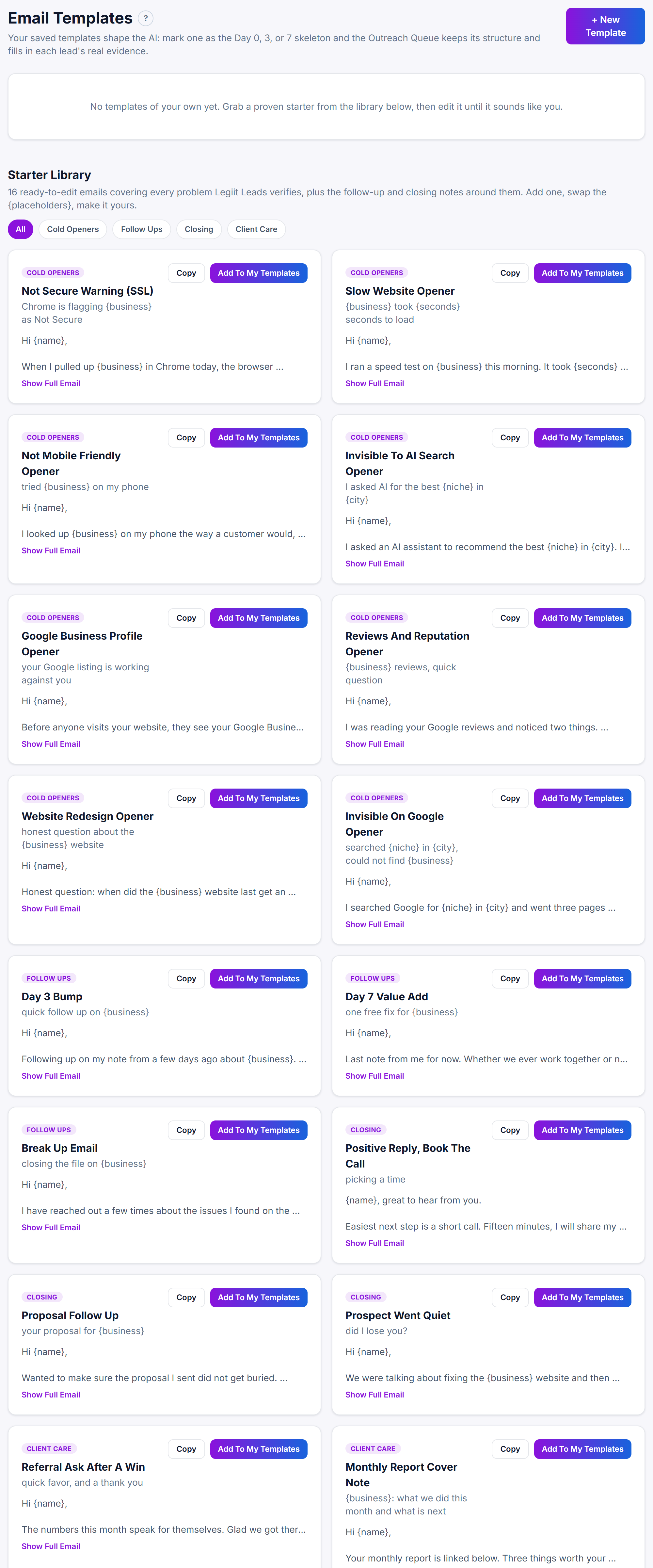
The Starter Library is a set of 16 ready-made emails at the bottom of the Email Templates page, grouped into four categories: Cold Openers, Follow Ups, Closing and Client Care. You can read each one in full, copy it to your clipboard, or click Add To My Templates to save your own copy.
What is in it
Cold Openers (8 emails)
First emails to a prospect, most built around one kind of problem Legiit Leads verifies:
- Not Secure Warning (SSL): the browser flags the website as Not Secure.
- Slow Website Opener: the website is slow to load on a phone.
- Not Mobile Friendly Opener: the website does not fit a phone screen.
- Invisible To AI Search Opener: an AI assistant recommends competitors instead of the business.
- Google Business Profile Opener: the Google listing is missing pieces.
- Reviews And Reputation Opener: the business has Google reviews but does not reply to them. Legiit Leads does not check replies, so read the reviews before you send this one.
- Website Redesign Opener: the website looks out of date.
- Invisible On Google Opener: the business does not come up when you search its trade and city.
Follow Ups (3 emails)
- Day 3 Bump: a short nudge a few days after the opener.
- Day 7 Value Add: gives away one free fix and offers a booking link.
- Break Up Email: the last note, closing the file politely.
Closing (3 emails)
- Positive Reply, Book The Call: for a prospect who replied with interest.
- Proposal Follow Up: a nudge after you have sent a proposal.
- Prospect Went Quiet: for a conversation that stopped.
Client Care (2 emails)
- Referral Ask After A Win: asks a happy client for an introduction.
- Monthly Report Cover Note: a short note to send with a client's monthly report.
Using the library
- Click Email Templates in the sidebar and scroll down to Starter Library.
- Click a category button to filter the cards: All, Cold Openers, Follow Ups, Closing or Client Care. All shows all 16.
- Each card shows its category, title, subject line and the first few lines of the email. Click Show Full Email to read the rest, and Hide Full Email to fold it back.
- Click Copy to put the email on your clipboard. The copied text starts with a
Subject:line, then the email. The button shows a tick for a moment once it has copied. - Click Add To My Templates to save a copy under My Templates at the top of the page. The page scrolls up to it, and the button on the library card changes to Added ✓.
Good to know
- The emails contain slots in curly brackets, such as
{name},{business}and{proof_link}. Copy leaves them exactly as written, so replace them yourself before you send. When a saved template is used as the AI's skeleton for a sequence day, they are filled in for each lead. See what the placeholders mean. - Added ✓ shows while you have a saved template with the same title. If you delete that template, the button goes back to Add To My Templates.
- Once a starter is saved under My Templates, you can make it the AI's skeleton for Day 0, Day 3 or Day 7 of a sequence. See how to make the AI use your template.
Was this helpful?
Thanks, that helps us improve this article.
Still stuck?
A real person on the Legiit team will help. No bots, no runaround.
Contact Supporthelp@legiit.com