How do I resurrect an old lead list from a CSV?
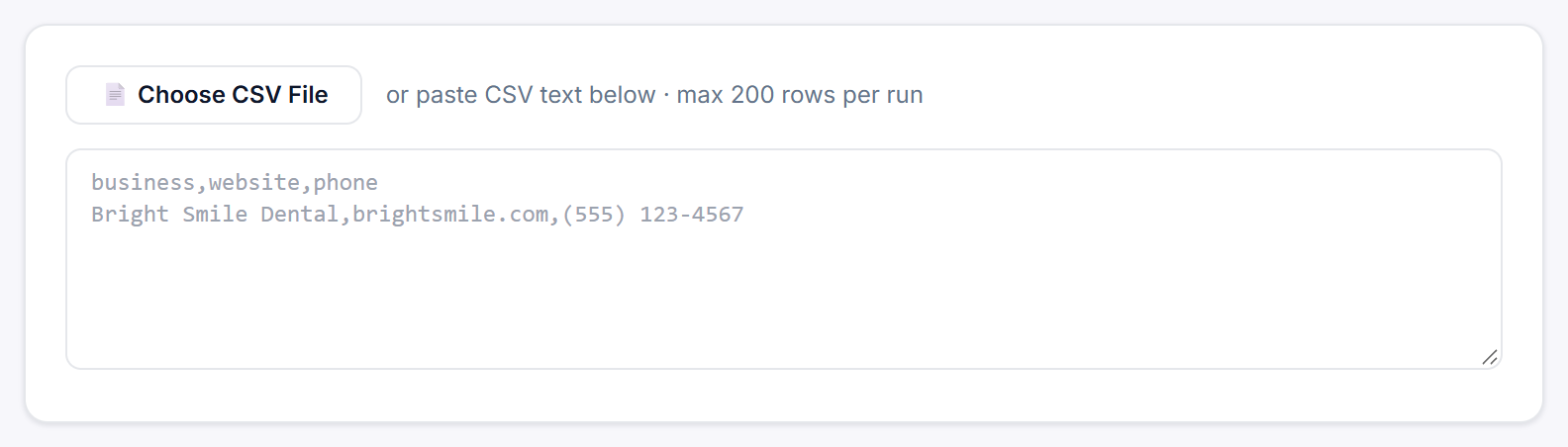
Open Resurrect a List in the sidebar, load your CSV file, check which columns hold the business name, website and phone, give the import a name and click Resurrect N Rows. Legiit Leads audits every website on the list live and takes you to the results page, which fills in as each business is checked. It works on every plan, and each import of up to 200 rows counts as 1 search from your monthly allowance.
Steps
- Click Resurrect a List in the sidebar.
- Click 📄 Choose CSV File and pick a
.csvfile, or paste the CSV text into the box underneath. The first line must be the column headers. - Check the three column pickers that appear (see below). Business name column (required) must point at the business names.
- Type a name in Label this import, for example
Old D7 dentist list. This becomes the search's name in Search History. If you leave it blank, the search is calledImported list. - Read the line above the button. It says how many data rows were found, for example
42 data rows detected, and reminds you that the import counts as one search against your quota. - Click Resurrect N Rows (for example Resurrect 42 Rows). The button reads Starting… for a moment, then the results page opens.
The column pickers
- Business name column (required): the only column you must have. It shows Pick a column… until one is chosen.
- Website column: optional. Choose Not in this file if your list has no websites.
- Phone column: optional, also with Not in this file.
Legiit Leads guesses each picker from your headers: a header containing business, company or name for the business name, one containing website, url, domain or web for the website, and one containing phone, tel or mobile for the phone. Always check the guesses, especially if your file has more than one column with "name" in its header.
What happens next
The results page fills in live, 6 businesses at a time, and shows LIVE: auditing this market while it runs. Its title is your label followed by the row count, for example Old D7 dentist list in 42 imported rows. You can leave the page: the import carries on, and Search History shows it as Running and then Complete.
Leads are sorted highest score first. Each one opens the same lead drawer as a normal search, and Export CSV and + Pipeline work as usual. To see exactly what is done to each row, read what happens to each row.
Good to know
- Only the business name, website and phone columns are used. Other columns, including any email column, are ignored: emails come from the live audit of each website.
- Only the first 200 rows that have a business name run. Split bigger files and import each part; each part counts as 1 search.
- Labels longer than 80 characters are cut short.
- If you change the pasted text after setting the pickers, they go back to their guesses, so check them again before you click.
- To audit the same list again later, import it again.
Still stuck?
A real person on the Legiit team will help. No bots, no runaround.
Contact Supporthelp@legiit.com