What do the Pipeline stages mean?
The Pipeline board has five columns: Working (leads you chose to pursue), Contacted (an email went out or a call was made), Replied (you are in conversation), Won (the deal closed) and Lost (no fit or no reply). It only holds deals you are working, never raw search results, and it is included on every plan.
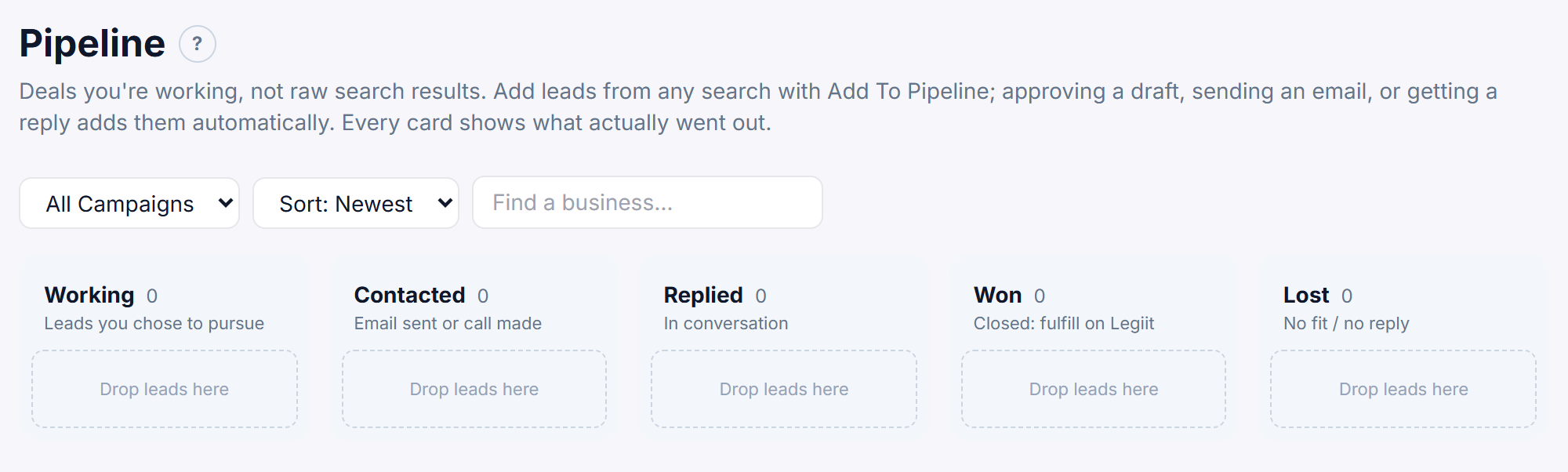
The five stages
Each column shows its name, how many cards are in it, and a short hint. An empty column shows Drop leads here.
- Working: leads you chose to pursue that nobody has contacted yet.
- Contacted: an email actually went out to the lead, or a call was logged.
- Replied: the prospect is in conversation with you, for example they replied or booked a call.
- Won: the deal closed. This is where you fulfill the work on Legiit.
- Lost: no fit, or no reply.
Working is also the stage every new lead starts in, so a lead you have not worked yet shows Working in the Status column of your search results. That word in the results does not mean the lead is on the board. The next section lists what puts it there.
Which leads appear on the board
A lead from your searches only shows up once one of these has happened:
- You added it with + Add To Pipeline in the lead panel, or + Pipeline on a results row. It lands in Working.
- You approved or skipped one of its drafts in the Outreach Queue. It also lands in Working.
- Its stage moved on from Working: an email went out, a call was logged, the prospect replied, booked a call or accepted a proposal, or you clicked a different status pill. It appears in that column.
Filters
- All Campaigns: pick one search to see only its deals. The list only offers searches that have leads on the board.
- Sort: Newest shows the most recently added deals first (a deal that reached the board without being added is dated by its search). Sort: Score shows the highest opportunity score first.
- Find a business… narrows the board to business names containing what you type.
What each card shows
- The business name, opportunity score, city, business type and first email address.
- The honest send state of its emails, for example
2 of 3 sent,1 approved, none sent yet,3 drafts waiting for approval,All touches skippedorNo emails drafted yet. It is green once something has been sent, and amber while an approved email has not gone out. - The latest entry on the lead's activity trail and how long ago it happened, for example
Moved to Contacted · 2h ago. - Open Drafts → (or Draft Emails → when nothing is drafted yet), which opens that lead in the Outreach Queue.
Click anywhere else on the card to open the lead panel.
Won cards
Cards in the Won column show two extras:
- → Needs fulfillment, until you click Mark Ordered on Legiit on the lead or place a Legiit order from the lead panel. It then reads ✓ Fulfilled on Legiit.
- ⧉ Find More Like This, which opens New Search with the deal's business type as the keywords and the problems found on that lead already ticked, apart from Invisible to AI Search, which you tick yourself if you want it. You pick the city. It runs like any other search: up to 60 businesses, using 1 of your monthly searches.
Good to know
On a phone or a zoomed-in browser, the board scrolls sideways instead of squeezing the five columns.
Still stuck?
A real person on the Legiit team will help. No bots, no runaround.
Contact Supporthelp@legiit.com